
We have often visited new clients and found that they don’t understand the difference between differential and incremental backups. Nor the consequences. Sometimes with the result that they have lost vital data. So here is a quick summary.
Incremental Backups
With incremental backups, only those files that have changed since the last full or incremental backup are copied.

This means that if you want to do a restore of all of your files then you need EVERY incremental backup, plus the most recent full backup (I emphasis the “every” as we have come across companies that were only keeping the last incremental backup and overwriting all previous incremental backups with this):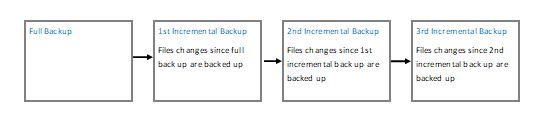
If one of these incremental backups is corrupted then you may not be able to restore all your data: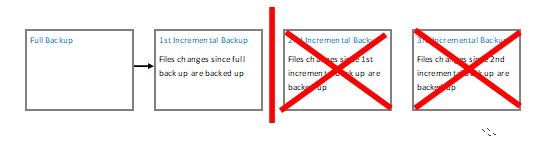
The advantages of this form of backup is that it is very quick. Also it does not require a lot of storage, as you are only backing up what has been changed since the last backup. Note, however, that you must keep every incremental backup until the next full backup.
The disavantages of this form of backup is that if it is a long time since your last full backup then restoring your data can take a long time. We know, we have done it! Also, if just one of the incremental backups is corrupted then you may not be able to restore data previous to it. For both of these reasons we would not recommend this type of backup.
Differential Backups
With differential backups, all data changed since the first full backup are copied.

This means that if you want to do a restore of all your files you need the latest differential backup and your latest full backup.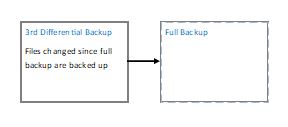
The advantages of this form of backup is that it is more robust. If one backup gets corrupted you should not lose all your data. It is quicker to restore from this type of backup too. For both these reasons we prefer this type of backup.
The disadvantages of this type of backup is that it takes longer and requires more storage space.
I know it is is obvious, but I should mention that both methods require you to have a good full backup. So it is worth ensuring that your full backups are without errors. Also, it is good policy to regularly do a full backup. Say every week (we have come across companies that did one full backup several years ago and then incremental backups ever since!).
I should also mention that you can supplement these external backups with shadow copying. This makes restoring one individual file and folder very quick and easy.
Rebecca Mansbridge
Technology Tamed
September 2017